


In this tutorial, we will learn How to Create a Bank Key
Step 1) Enter FI01 into the SAP transaction code box

Step 2) In the next SAP Screen
- Enter the Bank Country.
- Enter the new Bank Key.
- Click Enter Button

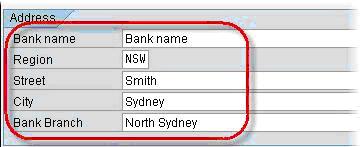
Step 3) In the next SAP screen , under the Address section
- Enter the Bank’s name.
- Select the appropriate region.
- Enter the bank’s street address.
- Enter the Bank’s city.
- Enter the appropriate branch name
Step 4) In the control data section
- Enter the bank’s SWIFT code
- Enter the bank’s group
- Tick the Post. Bank Acct checkbox

Step 5) Click Save . A new Bank Key is created.


